
Advertised vs Actual Broadband Speeds in NZ
When you sign up for broadband in New Zealand, the speeds advertised - like "Fibre 300" or "Fibre Max" - represent the maximum under ideal conditions. In reality, what you experience at home often falls short. Factors like WiFi interference, outdated equipment, and peak-time congestion can reduce speeds by up to 60%. For example, Fibre 300 plans advertise 300 Mbps, but users often see around 310 Mbps during peak times, while wireless connections like 4G Fixed Wireless average much lower at 47 Mbps.
Here’s what you need to know:
Fibre connections generally deliver or exceed advertised speeds.
Copper and wireless technologies (like ADSL, VDSL, and 4G) often operate at their technical limits.
WiFi setups and old equipment are common culprits for slower speeds at home.
If your internet feels slow, check your router placement, upgrade to modern hardware, or consider a mesh WiFi system for better coverage. Testing your speeds with tools like Speedtest.net can help identify the issue. Fibre plans remain the best option for consistent and reliable performance.
What Advertised Broadband Speeds Mean
Let’s break down what those advertised broadband speeds actually mean.
When you see plans like "Fibre 300" or "Fibre Gig", the numbers refer to the maximum speeds in Mbps or Gbps (1 Gbps equals 1,000 Mbps) [6]. In New Zealand, these advertised speeds are based on average real-world performance during peak usage times - typically between 7 pm and 11 pm on weekdays [6].
To ensure accuracy, the Measuring Broadband New Zealand (MBNZ) programme tests broadband connections using wired Ethernet setups, providing benchmarks that reflect actual performance [6]. As Tristan Gilbertson, Telecommunications Commissioner, explains:
"Providers have moved away from the unhelpful and confusing practice of using 'up to' theoretical maximum speeds and are instead using independently verified speeds from the Commission's Measuring Broadband New Zealand (MBNZ) programme." [5]
Understanding the difference between download and upload speeds is equally important. Download speed measures how quickly data reaches your device, which is essential for activities like streaming 4K videos (requiring at least 25 Mbps) or downloading large files [1]. Upload speed, on the other hand, determines how fast data is sent from your device - key for video calls, online gaming, or uploading content [1][4].
Common Advertised Speed Examples
Here’s a table comparing advertised speeds with actual averages, to help you see how they stack up in real-world conditions:
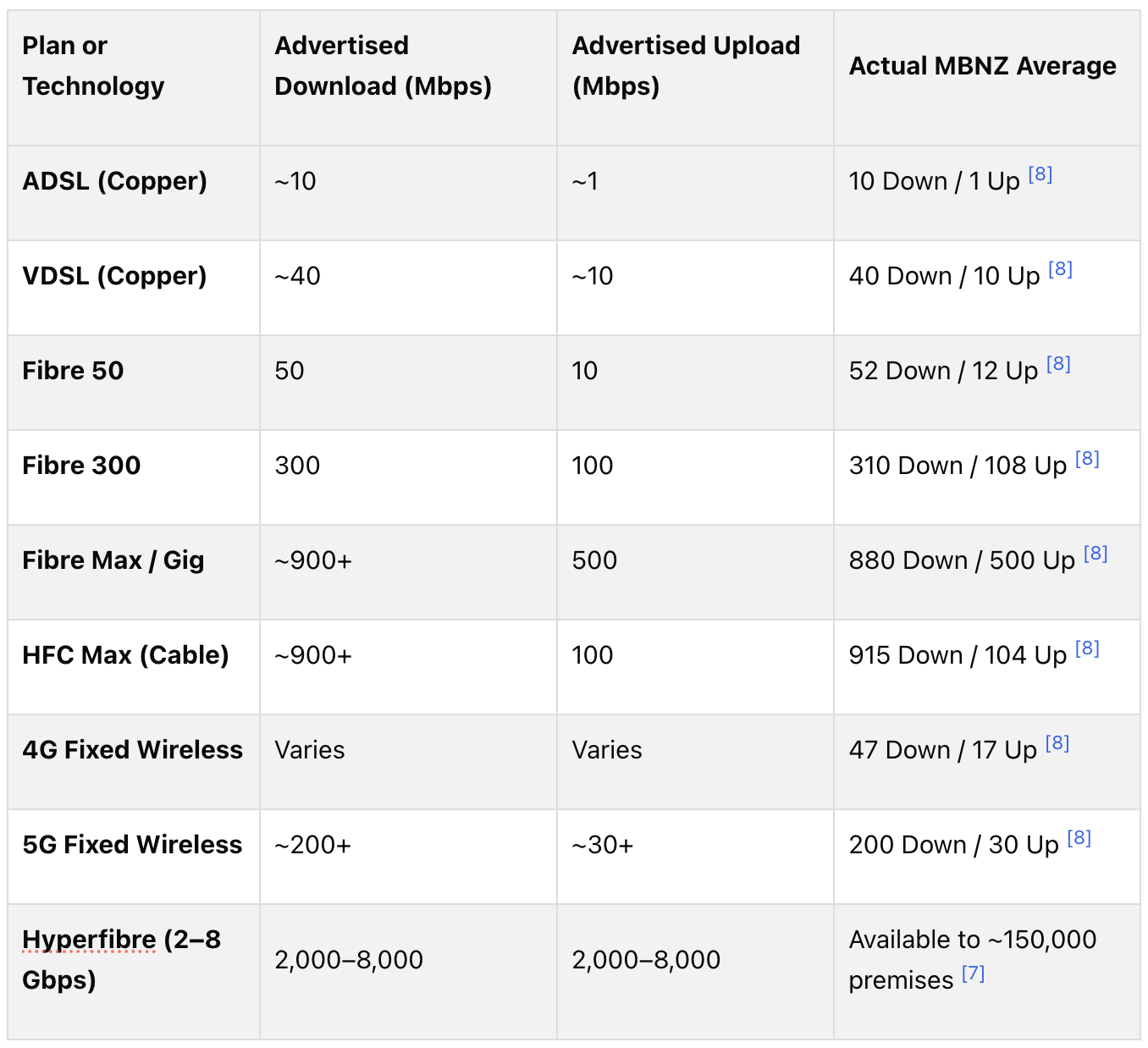
For most Kiwi households, Fibre 300 offers an excellent balance, providing consistent speeds of 310 Mbps for downloads and 108 Mbps for uploads [8][4]. If you’re a heavy user - whether uploading large files or juggling multiple high-bandwidth tasks - Fibre Max is a solid choice, with download speeds often exceeding 834 Mbps [4]. And for those looking to stay ahead of the curve, Hyperfibre plans (ranging from 2 Gbps to 8 Gbps) are gradually becoming available in Auckland and Wellington, ideal for future-proofing your home network [7].
What Speeds Users Actually Get
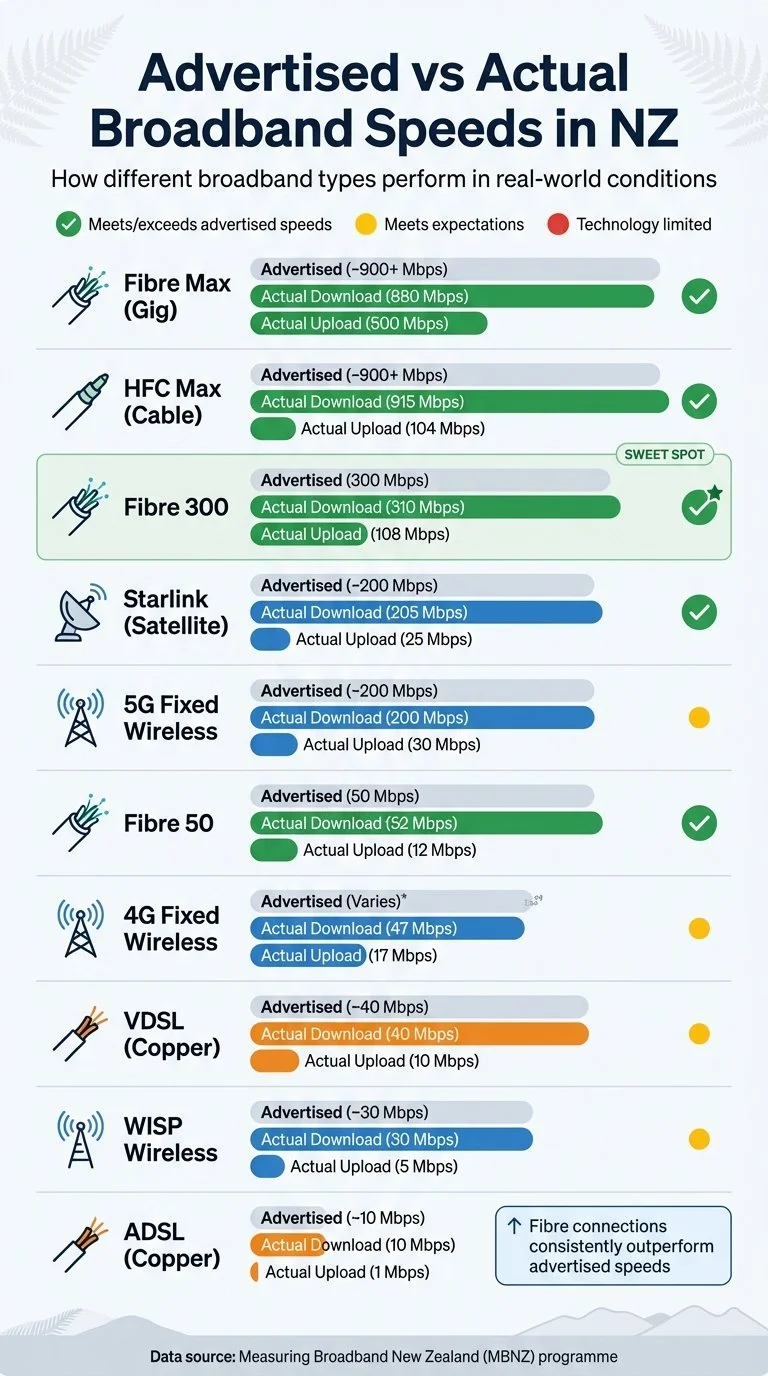
NZ Broadband Speeds: Advertised vs Actual Performance Comparison
Most New Zealanders are getting what they pay for - especially when it comes to fibre broadband. According to the Commerce Commission's Measuring Broadband New Zealand (MBNZ) programme, fibre plans often meet or even exceed their advertised speeds. For instance, Fibre 300 plans deliver an average download speed of 310 Mbps and upload speed of 108 Mbps, consistently outperforming their advertised tier [3]. This reliability has paved the way for premium fibre upgrades, which have shown significant improvements in performance.
Premium fibre plans have made noticeable strides. After collaboration between the Commerce Commission and providers to address performance issues, Fibre Max plans now deliver speeds that align closely with their advertised figures. Tristan Gilbertson, Telecommunications Commissioner, highlighted this progress:
"The performance of Fibre Max plans has substantially improved... overall performance is now in line with advertised speeds." [9]
However, not all broadband technologies perform equally. Copper-based connections, like ADSL and VDSL, are inherently limited by their design, offering average speeds of around 10 Mbps and 40 Mbps respectively. Wireless options show more variation - 4G Fixed Wireless averages 47 Mbps download, while 5G Fixed Wireless reaches an average of 200 Mbps. Satellite services like Starlink also perform well, with an average download speed of 205 Mbps [3].
Speed Comparisons by Broadband Type
Here’s a breakdown of how actual speeds compare to advertised speeds across various broadband technologies:
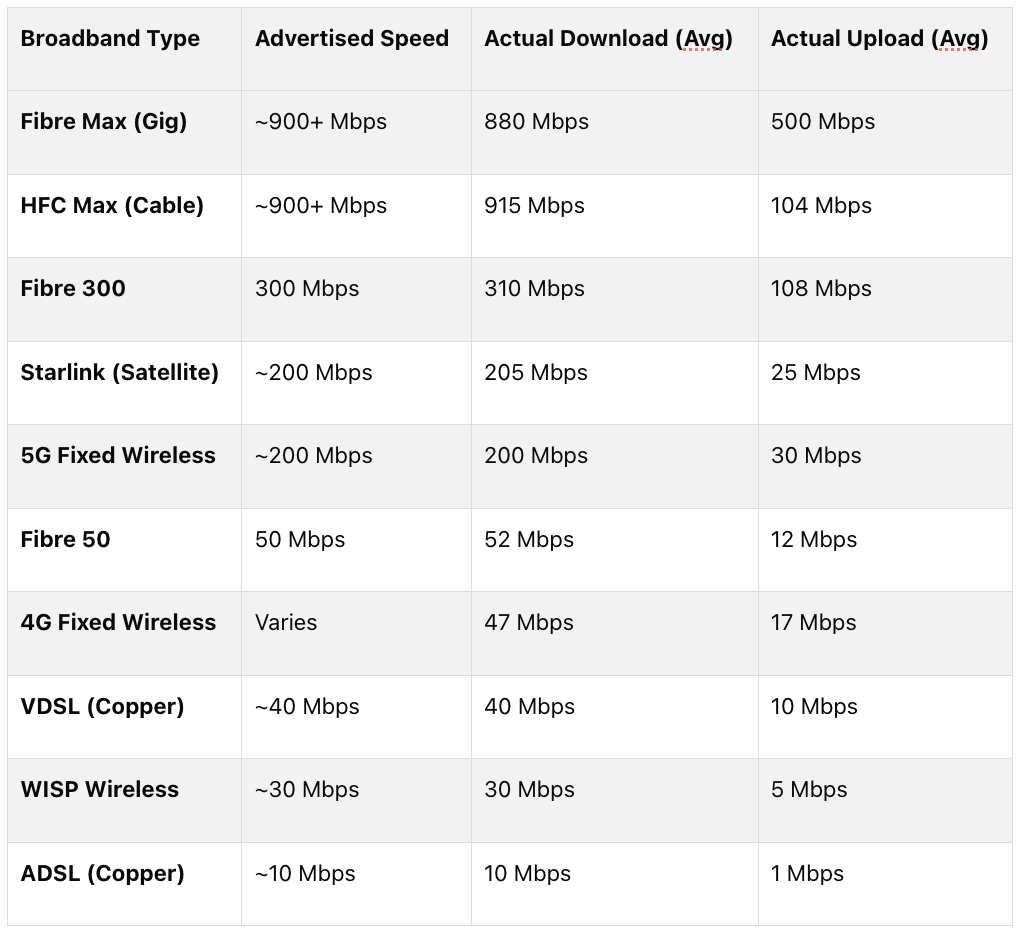
Data source: Measuring Broadband New Zealand (MBNZ) programme [3]
This data highlights a clear trend: fibre connections consistently outperform their advertised speeds, while copper and wireless technologies operate within the limits of their design. It’s worth noting that while cable (HFC Max) provides excellent download speeds, its upload speed of 104 Mbps is significantly slower than Fibre Max’s 500 Mbps. This can be a key factor for users who need fast upload speeds for tasks like video conferencing or sharing large files. Up next, we’ll explore why actual speeds sometimes fall short.
Why Actual Speeds Fall Short
Even with optimal fibre connections, the speeds you experience on your devices often fall short of what’s advertised. The gap between the speed reaching your router and what you actually get on your laptop or phone is usually caused by several factors - most of which originate within your home.
Main Causes of Slower Speeds
WiFi is often the weak link. Advertised speeds are typically measured using a wired Ethernet connection, but most people in New Zealand rely on WiFi for daily use. WiFi, however, is subject to radio frequency limitations and interference from the environment, so it rarely delivers the full potential of your fibre connection. The Commerce Commission's RealSpeed report from April 2024 highlighted that broadband speeds on high-tier fibre plans can drop by over 60% between the router and the device [2].
Outdated equipment can hold you back. Older routers and modems may not be equipped to handle modern high-speed internet, and the same applies to ageing laptops or smartphones, which might not support the speeds your fibre connection can provide.
Peak-time congestion slows everyone down. During busy evening hours, when households are streaming, gaming, or working online, speeds can take a noticeable dip [1]. Within your home, multiple devices streaming high-resolution content or running updates can further stretch your available bandwidth [10].
Your home layout impacts signal strength. Walls, furniture, and even other electronic devices can weaken WiFi signals. The further your device is from the router, the weaker and slower the connection will be.
While many of these issues stem from user-side factors, the broadband technology itself also plays a role in limiting speeds.
Technology-Specific Limitations
Each type of broadband connection comes with its own built-in constraints. Copper-based connections like ADSL and VDSL degrade over distance. The further you are from your ISP’s exchange or cabinet, the slower your speeds will be [1]. No amount of hardware upgrades can overcome this limitation.
Wireless broadband (4G and 5G) performance depends heavily on your distance from the nearest cell tower and the number of users connected to it [10]. During peak usage times, factors like cell tower congestion, building interference, weather, and terrain can further reduce speeds.
Fibre connections are the most reliable option, but even they aren’t immune to slowdowns. Most bottlenecks occur within the home, often due to suboptimal WiFi setups rather than the fibre connection itself.
All of these factors explain why the speeds you experience on your devices can fall short of what’s promised in advertisements.
How to Test and Improve Your Speeds
Using Speed Test Tools
To check your internet speeds accurately, use a dedicated speed testing app instead of a web browser. Browsers can cap speeds on connections above 100 Mbps, which might skew your results [11]. Speedtest.net is a popular choice worldwide, but local options like the Spark Speed Test or One NZ's speed test are also trustworthy [11]. For the most accurate results, connect your computer directly to your modem using an Ethernet cable (Cat 5e or newer). Before running the test, take a few precautions: close background apps, disconnect unnecessary devices, and restart your modem [11].
Timing is also key. Test between 10 am and 3 pm to measure your maximum speeds, and between 7 pm and 11 pm to see how your connection performs during peak hours. According to the January 2026 Measuring Broadband New Zealand report, Fibre Max plans delivered an average of 881 Mbps download and 507 Mbps upload during peak times, while Fibre 500 plans averaged 515 Mbps download and 107 Mbps upload. Under optimal conditions, you should expect about 80–90% of your plan’s advertised download speeds [11][13]. If your results fall far below these benchmarks, it’s worth investigating further.
Once you've assessed your speeds, you can take steps to improve your connection.
Ways to Increase Your Speeds
Start by positioning your router in a central, elevated spot, away from obstructions like concrete walls, microwaves, or cordless phones [12]. For larger homes or those with multiple levels, consider investing in a Mesh WiFi system, such as the Spark Smart Mesh 2, to eliminate dead zones and maintain smooth connectivity throughout your space [11].
Regular hardware upgrades are crucial. Replace your equipment every five years to ensure compatibility with modern standards like WiFi 6 or WiFi 7 [12]. Also, check the cable connecting your fibre box (ONT) to your modem - make sure it’s at least Cat 5e, as older Cat 5 cables limit speeds to 100 Mbps [11]. For devices that require high bandwidth, a direct connection to the modem is recommended [12].
Keep your devices up to date. Outdated firmware, operating systems, or drivers can create bottlenecks that slow down your internet [12].
If these steps don’t yield noticeable improvements, it might be time to consider upgrading your broadband plan.
Finding Reliable Fibre Deals
If you’ve optimised your home setup and still experience sluggish speeds, it’s worth re-evaluating your broadband plan. Since there’s often a gap between advertised and actual speeds, finding a reliable fibre plan is crucial. Websites like Fibredeals.co.nz let you compare high-performance fibre options, helping you choose a plan that better suits your household’s needs [12]. Fibre connections, known for their consistency, might benefit from switching to a higher-tier plan or a provider with better backhaul and routing capabilities [11].
Conclusion
Based on the analysis of real-world speeds versus advertised ones, it's clear that the numbers promoted by providers represent peak performance under ideal conditions. In practice, most households achieve about 70–90% of these speeds [1]. Factors like equipment quality, network congestion during busy hours, and the distance between your router and devices all play a role in this gap.
Fortunately, broadband providers in New Zealand now rely on independently verified data from the Measuring Broadband New Zealand programme. This initiative has already led to a 36% reduction in complaints about broadband marketing [5]. As Telecommunications Commissioner Tristan Gilbertson points out, a well-thought-out setup can help you get the most out of your broadband:
"You don't want to buy a Ferrari-level of broadband and find yourself operate below potential – so consider the location of your Wi‑Fi router or investing in a new mesh system to unlock the potential of your plan" [2].
Choosing the right plan for your household starts with understanding your actual needs. For instance, a family streaming 4K movies and casually browsing the web will need far less bandwidth than a household with multiple gamers and remote workers. Take time to evaluate your usage over a year and test your speeds at different times of the day [5]. If outdated hardware is slowing you down, upgrading to a mesh system or using a wired Ethernet connection could resolve the issue without adding extra costs. For a better idea of what's available, visit fibredeals.co.nz to compare fibre plans based on real-world performance.
FAQs
Why is my WiFi so much slower than my plan speed?
Your WiFi might not be living up to your plan's promised speeds for several reasons. An outdated router, poor placement, or interference from walls and other electronics can all play a part. On top of that, network congestion or having too many devices connected at once can drag down performance.
To get things running smoother, consider these tips: upgrade your router if it's old, place it in a central, open spot, reduce interference from other devices, and try to limit how many gadgets are online during busy hours. These small changes can make a noticeable difference.
How can I tell if the problem is my ISP or my home setup?
To figure out whether the problem originates with your ISP or your home setup, start by testing your broadband speed. If the results are far below what your provider advertises, the cause could be network congestion, the distance from the exchange, or WiFi interference.
If the slowdown affects multiple devices, the issue is likely with your ISP. However, if only one device is experiencing slow speeds, it might be due to outdated hardware or poor WiFi placement. In that case, consider updating your hardware or repositioning your router to improve connectivity.
Do I actually need Fibre Max or Hyperfibre?
Fibre Max is a great fit for most households with high internet demands. It delivers average download speeds of about 840 Mbps, offering consistent performance that stays close to the advertised speeds. If your home requires ultra-fast internet for activities like 4K streaming, large file transfers, or multiple users streaming simultaneously, you might want to look into Hyperfibre. However, for general high-speed internet needs, Fibre Max provides a dependable and practical solution.